I was invited by ComputerScienceZone to share this fascinating infographic on my site – so here it is – a fascinating insight into the diversity and number of “things”, combined with the risks associated with the rapid growth and poor security.


I was invited by ComputerScienceZone to share this fascinating infographic on my site – so here it is – a fascinating insight into the diversity and number of “things”, combined with the risks associated with the rapid growth and poor security.
 When we talk about data security what do we actually mean?
 Data security means protecting data, such as database, from destructive forces and from the unwanted actions of unauthorised users.
In the UK, the Data Protection Act is used to ensure that personal data is accessible to those whom it concerns, and provides redress to individuals if there are inaccuracies. This is particularly important to ensure individuals are treated fairly, for example for credit checking purposes. The Data Protection Act states that only individuals and companies with legitimate and lawful reasons can process personal information and cannot be shared.
The international standard ISO 27001 covers data and information security. Information security is the practice of defending information from unauthorised access, use, disclosure, disruption, modification, perusal, inspection, recording or destruction. It is a general term that can be used regardless of the form the data may take (e.g. electronic, physical)
Data Security is subject to several types of audit standards and verification, the most common are ISO 27001, PCI, ITIL. Security Administrators are responsible for creating and enforcing a policy that conforms to the standards that apply to their business.
IT certification audits are generally carried out by 3rd parties although regular internal audits are recommended. Clients can also carry out audits before they begin doing business with a company to ensure that their clients data is secured to their standards.
A security policy is a comprehensive document that defines a company’s methods for prevention, detection, reaction, classification, accountability of data security practices and enforcement methods. It generally follows industry best practices as defined by ISO 27001, PCI, ITIL or a mix of them. The security policy is the key document in effective security practices. Once it has been defined it must be implemented and modified and include any exceptions that may need to be in place for business continuity. Most importantly all users need to be trained on these best practices with continuing education at regular intervals.
Data needs to be classified in the security policy according to its sensitivity. Once this has taken place, the most sensitive data has extra measures in place to safeguard and ensure its integrity and availability.
All access to this sensitive data must be logged. Secure data is usually isolated from other stored data and it is important that controlling physical access to the data centre or area where the data is stored is implemented.
Active Directory for example is used by many companies and is a centralised authentication management system that is used to control and log access to any data on the system.
Encryption of the sensitive data is critical before transmission across public networks. The use of firewalls on all publicly facing WAN connections needs to be in place and also the deployment of VLANs’ to isolate sensitive departments from the rest of the network. It is important to shut down unused switch ports. If Wi-Fi is deployed then it is important to use authentication servers to verify and log the identity of those logging on. Finally the deployment of anti-virus and malicious software protection on all systems.
Sometimes you will be surprised what you can find by simply walking around and look for passwords in the open, unattended screens.
Ensure that Event Viewer and Log Files are maintained this provides the audit trail. An Intrusion Detection/ Protection systems (IDS/IPS) to monitor the network and system activities for malicious activities or policy violations. Set up SNMP monitoring servers to monitor and alert for everything as this will alert Administrators to everything from unusual bandwidth usage to hardware failure. It is key to know what’s going on with your systems and network.
Documentation is also important, detailed network maps should be available as these maps make it easier to spot security weak points and any flaws in the design that could impact the data security.
You should also consider a network scanner that probes devices to ensure that they are secure. A network scanner will probe and report old out of date software, open ports and the give details on any potential exposures. Networks scans should be scheduled on a regular basis.
Review log files regularly of any publicly facing server to see what types of attacks are being run against your enterprise.
Trade publications discuss the latest threats and technologies keeps you updated on the latest attack trends. It is important to understand the technology stack that you are protecting and the technology that is used to attack it.
Something which tends to not be given the required level of importance is user education. All relevant security policies must be clearly explained to the end users. A clear explanation of the consequences for violating these polices must also be explained. The end user needs to sign a document acknowledging that they understand the policies and consequences for violating these policies.
Any enforcement must obtain executive authority to enforce the business policies and procedures. This must be based on a systematic approach of warnings and punishments.

The author, Tony Schiffman, is Data Security Director at Data Compliant. If you have any concerns about your organisation’s data security or vulnerabilities and you’d like a chat, please call Tony on 01787 277742 or email dc@datacompliant.co.uk

Many data breaches are a direct result of the attacker using individuals or employees to access systems or data, and it’s worth noting that 58% of large organisations and a third of SMEs fall prey to staff-related data breaches (*UK 2014 Information Security Breaches Survey).
With that in mind, I thought it would be helpful to summarise some points to help recognise and deal with phishing emails.
Phishing is a deceptive means of trying to acquire personal information such as your identity or data that you hold and access – for example your user name, passwords, credit card details, contact directories and so on. Phishing is typically carried out by email or instant message, which may ask you to provide the data directly, or it may send you to a website or phone number where you will be asked to provide data.
A phishing effort can be hard to recognise, particularly if it comes from a source that you are inclined to trust – for example a friend or colleague (who may have been phished themselves), or your bank, social media site, telephone provider etc.
There are ways to recognise and avoid being caught out by fraudulent emails or the links they contain.
Such links are likely to include all or part of the legitimate website address.
Being aware and understanding how to spot a potential phishing effort is helpful, but additional steps should be taken to protect your computer and system against such attacks. There is no single solution – the best option is to adopt a multi-layered approach:
Just opening the email is unlikely to cause a problem. However, it is helpful to report phishing emails:
If you have any concerns about your organisation’s vulnerability to phishing attacks and you’d like a chat about staff training or prevention, just call 01787 277742 or email dc@datacompliant.co.uk
It’s becoming an increasingly essential part of due diligence that a data controller, when appointing a data processor, will ask one simple question: “Do you have ISO 27001 Certification?” Given that data controllers are the liable parties for any data breaches or lack of compliance, they need to be certain their data is to be processed safely. So if the answer is “no”, the processor is unlikely to win the contract unless they have some other extraordinary and unique competitive advantage.
I was going to write a blog about why ISO 27001 certification is so important. Then I thought it would be simpler just to show you. It’s all about protecting your business from potential breaches.
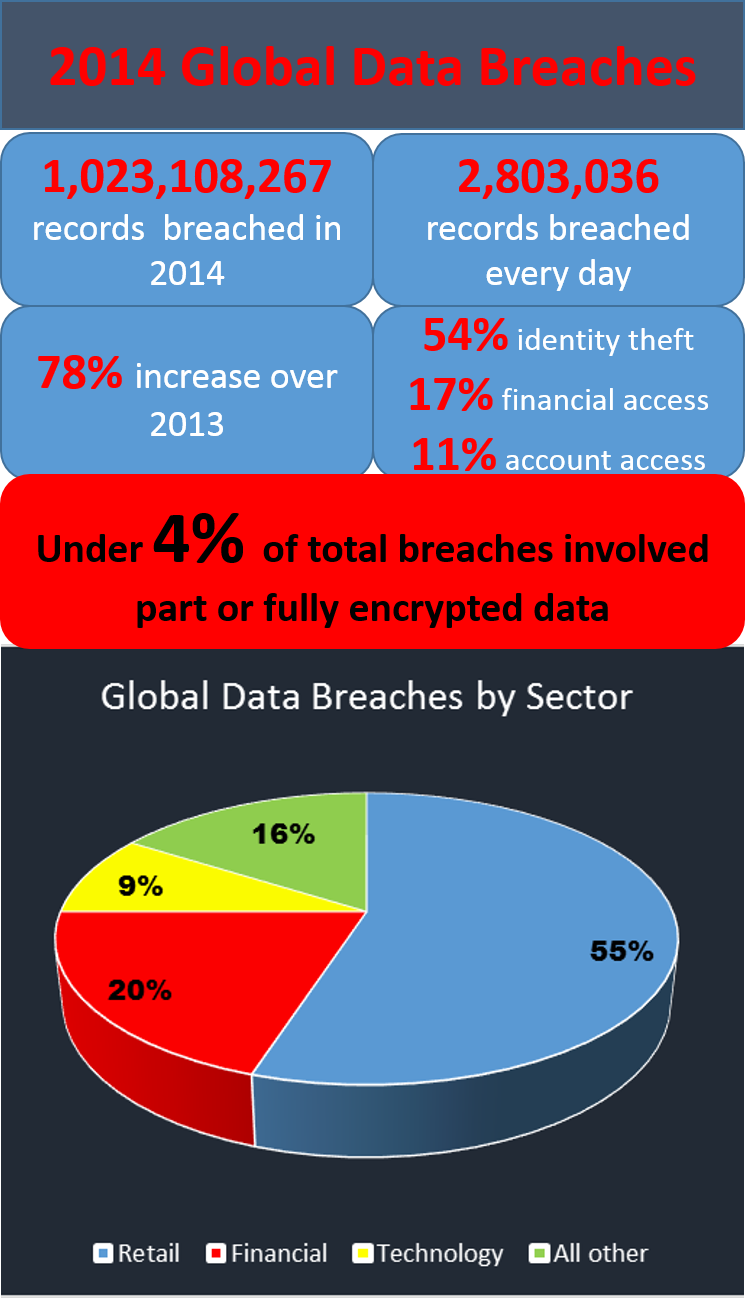 From the stats above, taken from the 2014 Year of Mega Breaches and Identity Theft, it’s clear to see:
ISO 27001 is an international standard for data security management, providing a risk-based approach to data security that involves a data governance standard that is embedded throughout the business covering processes, technology, employees and training.
In the past, obtaining ISO 27001 certification has been a time-consuming, arduous and costly exercise. Now, however, the whole process of creating the gap analysis, providing robust policies and procedures, and obtaining certification can be made much simpler.
If you’d like to know more about getting ISO 27001 quickly, simply and cost-effectively, please get in touch on 01787 277742 or email victoria@datacompliant.co.uk – we’ll be happy to have a chat and answer your questions
Retail and financial services websites are at the highest risk from attack, and Christmas – with a projected online spend of £17.4bn** – is the most popular time of year for cyber criminals.
A Google study from a couple of weeks ago made an astonishing statement:

This is a particularly worrying statistic given that data security breaches carry a huge cost – both to reputation and financially.

The costs of a breach increase every year, and will inevitably continue to rise as new legislation comes in with greater powers to the ICO.
So it’s time for retailers to make sure their staff don’t fall into the 45% of successful phishing attacks, and understand how to minimise security risks to the business.

Data Compliant provides data security training workshops for companies who want their employees to understand how to keep their data secure.
2-hour security workshops for up to 10 attendees per session are available from January 5th 2015. The usual cost is £1,100*. Within the workshop, we’ll demonstrate how to recognise and avoid phishing attacks.
* Stats taken from UK 2014 Information Security Breaches Survey – Department for Business Innovation and Skills
**stats from internetretailing.net
* Costs exclude VAT and expenses.
 Smartphones are becoming cleverer by the day. I use mine as an address book … to read books … listen to music … search the internet … look at emails … find my husband … use social media … keep track of the news … take pictures … and so much more. I even use it to make and receive calls and texts.
But from a security point of view, smartphones can be leaky, and increasingly it’s down to the user rather than the provider to take responsibility for their own protection. Here is some simple guidance and some references for those who’d like more information:
Smartphones – as important as your wallet and credit / debit cards
Ofcom advises that you treat your smartphone as carefully as your wallet or a bank card, and that’s excellent advice. Losing your smartphone is inconvenient at best and a disaster at worst. There’s the potential expense of any charges that a thief might run up before you report it as lost. And, unless it’s insured, the cost of replacing a smartphone can be horribly expensive.
Not only that, but any confidential information is at risk – your contacts, your emails, even your bank account. And it’s no longer just your own data at risk. If you use your smartphone for business, losing it may have potentially serious implications for you and your company in the event of a data breach.
What to do before you lose your smartphone
How to keep your data safe
What to do if you lose your smartphone
What to do when you get rid of your phone
Before disposing of your smartphone, make sure that you:
Above all, smartphones should be treated as the valuable assets they really are, and kept safe to protect both personal and company assets data and assets.
If you have any concerns about your data security in general or your smartphone security specifically, contact us on 01787 277742. Or email victoria@datacompliant.co.uk


It’s clear that the innovative and accessible technical services provided by cloud computing are increasingly being selected and used by businesses. And there are good reasons for doing so – not least accessibility, cost, reliability, resilience, and innovative products. However, there are also risks to data protection which data controllers need to consider and be sure that such their cloud processing activity complies with the Data Protection Act.
What is cloud computing?
Cloud computing covers a broad range of services and technology, but the Information Commissioner’s Office (ICO) defines it as:
“access to computing resources, on demand, via a network”
To explain:
Resources include storage, processing, software
On Demand simply means that the resources are available to the customer or user on a scalable, elastic basis, typically through virtualised resources
Via a Network refers to the transit of data to and from the cloud provider, which may be over a local or private network, or across the internet.
The Data Protection Act (DPA) and Cloud Computing
All operations involving personal data that take place in the cloud – including storage – must comply with the DPA, and it is the data controller who has ultimate responsibility for that compliance.
However, if layered cloud services are being used (eg different cloud providers of software, platforms or infrastructure) then it’s quite possible that there will be a number of data controllers and data processors working together to deliver services which included processing personal data.
The cloud customer is most likely to be the data controller, and will therefore have overall responsibility for complying with the DPA. However, depending on precisely the role of the cloud provider, the customer must assess whether the cloud provider is simply a contracted data processor or is, indeed, a data controller in its own right – which may be the case if a cloud provider in any way determines the purpose(s) for which the personal data are to be processed. In this case the cloud provider will be responsible for its own data protection compliance.
12 Cloud-specific DPA Considerations
 There are some specific considerations for data controllers who have moved or are considering moving personal data to the cloud. Below are twelve:
8 Essential Policies and Processes
 Any business will benefit from formal, documented policies and procedures. Having made a decision to use cloud services, there are some specific requirements that are particularly important from a personal data compliance perspective:
The cloud is here to stay. If you’d like any information or have any concerns about your own cloud provider contracts, policies or compliance issues, please don’t hesitate to contact us:
victoria@datacompliant.co.uk
01787 277742
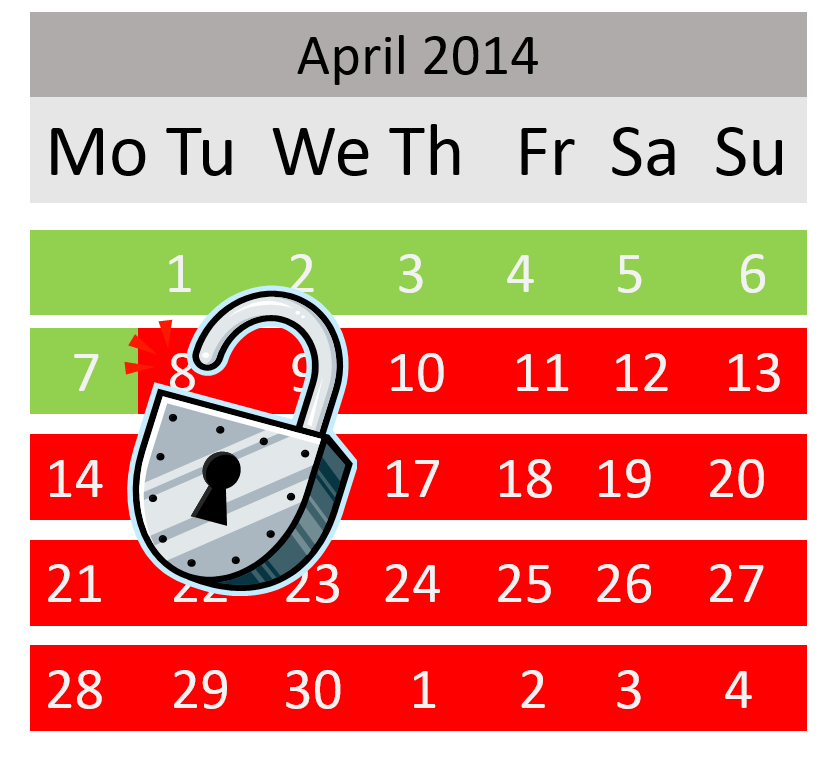 On 8 April 2014 , office support for Microsoft’s Windows XP and Microsoft Office 2003 will come to an end. Not the end of the world, you’d think, but if your organisation keeps personal information on those versions, this is a significant problem.
Though PCs will continue to run, the issue is that Microsoft will not be providing any further updates or fixes to these products. This means that in the event of any security flaw, your system will be vulnerable, and so in turn will any personal data you hold.
It is inevitable that, over time, attackers will increasingly find the vulnerabilities within these products, which will provide them with more and more opportunities to access and manipulate your systems. To prevent the risk of personal data breaches in these circumstances, the best advice is to migrate to a supported system before the deadline of 8th April.
It’s not just Microsoft where stopping system support is an issue – the same is true of other providers who do not support their systems. So it’s well worth making sure that you and your organisation have ‘appropriate technical organisational measures in place to keep individuals’ personal data safe.
Failure to do so puts you in breach of the Data Protection Act, and the ICO has the power to levy a fine of up to £500,000 to any organisation whose failure to comply with the DPA has led to serious issues of data security.
The size of fine varies enormously depending on the scale and potential damage caused by the breach. For example the ICO has recently fined the British Pregnancy Advice Service £200,000 after a hacker obtained thousands of individuals’ personal details due entirely to poor data security. And, on a smaller scale, the owner of a loans company, Jala Transport, was fined by the ICO after his car was broken into. The thief stole £3,600 and a hard drive. Even though the hard drive was password protected, the data within was not encrypted and it included customers’ names, dates of birth, payments made, and the identity documents provided to support the loan application. His fine could have been as high as £70,000, but was reduced to £5,000 to reflect the limited financial resources of the company and the fact that the breach was reported voluntarily.
In both cases, the breaches were perpetrated by a malicious third party. But it was the lack of the businesses’ security and protection of the personal data that was the root cause of the fines. This is why it is so important that companies remain ready for the security issues which will inevitably arise when their service providers switch off support – whether the provider is Microsoft or another.
Data Compliant helps businesses build policies and processes to enable them to become and remain secure and compliant both in terms of systems and governance – if you have any concerns over your data security, don’t hesitate to contact us on 01787 277742 or email tony@datacompliant.co.uk
 Data Security
This article has been written to help companies, particularly SMEs, understand the significance and importance of strong data security and excellent staff training, specifically in relation to data protection compliance within their own businesses when dealing with personal and sensitive data.
Apart from the obvious necessity to keep your premises physically secure, and shred any confidential paperwork, there are four main areas covered by this article:
Computer security
Protecting your computers and computer networks includes a number of steps, which can be relatively simple and straightforward to implement. As is often the way, anything is simple if you know what to do and how to do it. For example, simple security steps include:
Encryption
If sensitive personal information is stolen or lost, it is highly likely to cause damage or distress. To minimise the risk of disclosure, any such personal information really should be encrypted. The truth is that login usernames and passwords offer only minimal protection – absolutely not enough to protect against illegal – or simply unauthorised – access. It is also worth remembering that enormous volumes of data can now be stored on tiny devices from memory sticks to smartphones.
Encryption can be a tricky area, so if you are uncertain of how encryption works, or the strengths and weaknesses of various types of encryption, Tony Schiffman can provide useful advice on how to keep your information secure. Just drop him a line at tony@datacompliant.co.uk
email security
Writing, sending and receiving emails is now taken for granted as just a part of everyday life. This may be why there are so many varied opportunities for error and carelessness. Some of the most common issues are summarised below:
Interesting (if irrelevant) note –we still use the term cc, which stands for carbon copy – going back to the days of typewriters when a sheet of coated carbon paper was placed between two or more sheets of paper. The pressure of the typewriter keys on the carbon papers would cause the ink to be transferred to the additional sheet(s) of paper, thus providing carbon copies. Bcc, of course, stands for blind carbon copy.
Staff Training
Training your staff to keep data secure is also vital. Staff can be held responsible for data compliance breaches and may sue their company if they have not been given essential training.
Did you know that your staff can be prosecuted if they deliberately give out personal details without permission? So it’s essential that their access to personal or sensitive data is limited purely to what they need to do their job, and they are trained to understand what they can and cannot do. For example:
If you would like to discuss staff training with Data Compliant, please contact victoria@datacompliant.co.uk
Data Breaches
Data security falls into a number of areas. Based on the ICO’s stated data breaches from April to July 2013, it is clear that security and staff training are critical elements in protecting the personal data you hold. The types of breach noted during that period are illustrated in the diagram below. It is notable just how significant security and staff training are in the prevention of protecting personal and sensitive data.

In our marketing and data consultancy, Tuffill Verner Associates, we have helped businesses navigate data permissions and compliance across B2C and B2B. With over 30 years experience each, Victoria Tuffill and Michelle Evans are well placed to help marketers stay compliant while still achieving their marketing goals. We provide clear, tailored practical and creative advice to marketers to solve the difficulties of achieving results while staying within the confines of legal compliance.
If you’d like to chat about your data compliance, security or governance needs, please contact Victoria or Michelle on 01787 277742 or by email – victoria@datacompliant.co.uk or michelle@datacompliant.co.uk
 The Data Compliant Blog